

Welcome to PRONI’s Valuation Revision Books Application. Explore digitised volumes of annual property valuations from 1864 to 1933 to trace changes to properties and their occupants over time. Use the searchable index and digitised volumes to uncover details to support your research.
Search the Valuation Revision Books
You can also browse the catalogue entries for all the volumes in this application by using the ‘Browse’ function in our eCatalogue and searching the PRONI reference ‘VAL/12/B’.
Further guidance
If you need help getting started with the application, see the guidance below.
For further guidance on PRON’s holdings of valuation records, you can view our printable information leaflet on Valuation Records.
Search by place name
The application is searchable by place name (city, town, street or Irish townland). Simply input the place name into the search field and select the search button. If you are searching the cities of Belfast and Derry/Londonderry, these have been indexed to street and ward level.
When entering the place name, you will be prompted to select one of the following search options:
- ‘All’ words - displays results containing all the words entered
- ‘Any’ word - displays results that contain any or all of the words entered
- ‘Exact’ phrase – displays results that contain all the words entered and in that exact order
Wildcard searches
If you are unsure about the spelling of a particular place name, you can add and asterisk(*) after a certain part of the word to yield results for all variations in spelling.
For instance, searching Tanderagee which is also recorded as Tandragee will show results for both spellings if you enter ‘Tand*’.
Be wary of using the wildcard search with words like Bally* or Tully* as these will return many results.
Abbreviations
Common words in the database may appear in different forms, such as ‘Street’ and ‘St.’, ‘Road’ and ‘Rd.’, or ‘Saint’ and ‘St.’. For the best results, try searching using both variations.
Apostrophes
When searching for place names with apostrophes, you may wish to search both with, and without the apostrophe as these may have been recorded differently in various volumes.
Variations in words
There may be some differences throughout the volumes in how certain place names have been recorded. For example, ‘Whiteabbey’ and ‘White Abbey’. For the best results, you may wish to search for both variations.
Search by location
You can also use the application to filter the place name results by county or by the cities of Belfast and Derry/Londonderry. You can then refine the location further by parish.
You do not have to select a parish, but if you know the parish you are looking for this will help to refine your search.
You can also search by location without a place name, which can be helpful if you do not know the exact place name but are confident of the county or parish you wish to search.
Search by PRONI reference
If you are looking to search the entries included in a particular volume in the VAL/12/B collection, you can enter the PRONI reference instead of a place name. Please note this cannot be used in combination with any other search function. This must be for a specific item reference and be accurate or you will see an error message.
The results will show you related volumes as well, which can be useful to consult for changes to the electoral boundaries, or demographics in certain areas.
Viewing results
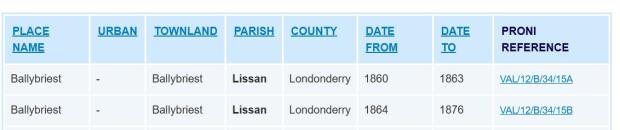
When you have submitted a search, the results will display with the following columns:
Place name
Urban (city, if applicable)
Townland
Parish
County
Date from and date to
PRONI reference (for the volume)
You can also sort the results in alphabetical order by any of the above columns.
Viewing the digitised records
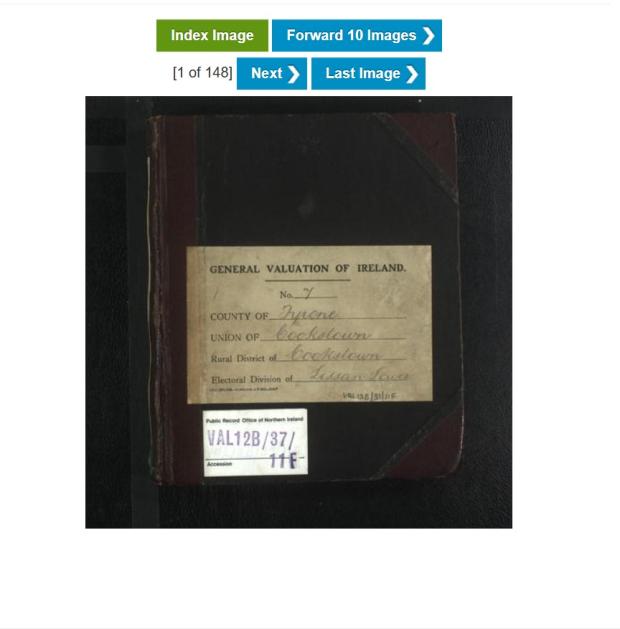
To view the digitised record for a result, select the PRONI refence listed. When browsing the record, you have the option to:
Navigate directly to the volume’s index (if it has one)
Browse backwards and forwards one page or ten pages at a time
Zoom in over the pages by hovering your cursor over specific areas
Pinch and zoom if using a smartphone or tablet
Save and print volume pages